Pull Web User Stats from Portal
Ellen Lester, Geospatial Programmer, City of Johnson City, TN
August 2018
The following code demonstrates how Johnson City uses python to extract the number of users of ArcGIS Pro, Business Analyst, City View, and Cartegraph by department. As well as the number of users in each department who own items or who have logged on within the last 7 or 30 days. Parts of this script are fairly specific to Johnson City's set up and may not apply to your organization or need to be significantly modified.
# Start by importing modules. The arcgis module runs in python 3 and can be easily installed through ArcGIS Pro
from arcgis.gis import GIS
import arcgis, arcpy, os, sys
from getpass import getpass
Sign into portal
Johnson City uses two portals- ArcGIS Online for public maps and a local Portal for staff maps. Both are used in this script for different purposes. ArcGIS Online is needed to get licensing information (ArcGIS Pro, Business Analyst, etc.) Portal is needed to group users by department
agol_address = # FILL THIS IN
username = # FILL THIS IN
password = # FILL THIS IN
agol = GIS(agol_address, username, password, verify_cert=False)

internal_portal_address = # FILL THIS IN
username = # FILL THIS IN
password = # FILL THIS IN
portal = GIS(internal_portal_address, username, password, verify_cert=False)
Pull licensing information from AGOL
Applications licensed through ArcGIS Online, such as ArcGIS Pro, Business Analyst, Insights, GeoPlanner, and Drone2Map can be accessed using the following code. In our case, we remove "jctngis" from the username so it will match the Staff Portal equivalent. For example elester@johnsoncitytn.org_jctngis in AGOL would be elester@johnsoncitytn.org in Portal.
# Get info about PRO users
# ArcGIS Pro
licenses = agol.admin.license.all()
pro = agol.admin.license.get('ArcGIS Pro')
pro_info = pro.all()
pro_users = []
i = 0
for p in pro_info:
    if p['lastLogin'] != -1: # -1 tells us they haven't used the license since assignment
        print(p['username'])

        # This code shows how we remove the jctngis suffix
        #if p['username'].endswith("jctngis"):
        #    pro_users.append(str(p['username'][:-8]))

        # Or you can just get the username directly
        pro_users.append(str(p['username']))

        i += 1
print(i)

# Get info about BA users
# Business Analyst
licenses = agol.admin.license.all()
ba = agol.admin.license.get('ArcGIS Business Analyst')
ba_info = ba.all()
ba_users = []
i = 0
for b in ba_info:
    if b['lastLogin'] != -1: # -1 tells us they haven't used the license since assignment
        print(b['username'])

        # This code shows how we remove the jctngis suffix
        #if b['username'].endswith("jctngis"):
        #    ba_users.append(str(b['username'][:-8]))

        # Or you can just get the username directly
        ba_users.append(str(p['username']))

        i += 1
print(ba_users)
Pull CityView users from a SQL database
Johnson City uses Harris Computer Systems' CityView for permitting. Below is an example query used to extract the number of people in each "business unit" that we care about. Even if you use CityView, your query will likely be quite different. However it is offered here as an example of how to call a SQL query from python.
sde = rest_of_the_path + os.sep + 'CityView.sde' # FILL IN rest_of_path
executor = arcpy.ArcSDESQLExecute(sde)
command = """SELECT 'Information Technology' as dept, 'CityView', Count(*) as people_count, NULL, NULL
  FROM [CityView].[dbo].[LookupEmployee]
  JOIN [CityView].[dbo].[LookupDepartment] on [CityView].[dbo].[LookupEmployee].[Department] = [CityView].[dbo].[LookupDepartment].[Code]
  WHERE LookupEmployee.flagActive =1 and (LookupDepartment.[Desc] = 'GIS' or LookupDepartment.[Desc] = 'Information Technology')
  union
  SELECT 'PW, Solid Waste, StormH2O' as dept, 'CityView', Count(*) as people_count, NULL, NULL
  FROM [CityView].[dbo].[LookupEmployee]
  JOIN [CityView].[dbo].[LookupDepartment] on [CityView].[dbo].[LookupEmployee].[Department] = [CityView].[dbo].[LookupDepartment].[Code]
  WHERE LookupEmployee.flagActive =1 and (LookupDepartment.[Desc] = 'Public Works' or LookupDepartment.[Desc] = 'Engineering' or LookupDepartment.[Desc] = 'City Arborist')
  union
  SELECT 'Dev Svc Permit and Enf' as dept, 'CityView', Count(*) as people_count, NULL, NULL
  FROM [CityView].[dbo].[LookupEmployee]
  JOIN [CityView].[dbo].[LookupDepartment] on [CityView].[dbo].[LookupEmployee].[Department] = [CityView].[dbo].[LookupDepartment].[Code]
  WHERE LookupEmployee.flagActive =1 and (LookupDepartment.[Desc] = 'Building/Codes' or LookupDepartment.[Desc] = 'Code Enforcement')
  union
  SELECT 'Admin and Support Svcs' as dept, 'CityView', Count(*) as people_count, NULL, NULL
  FROM [CityView].[dbo].[LookupEmployee]
  JOIN [CityView].[dbo].[LookupDepartment] on [CityView].[dbo].[LookupEmployee].[Department] = [CityView].[dbo].[LookupDepartment].[Code]
  WHERE LookupEmployee.flagActive =1 and (LookupDepartment.[Desc] = 'Finance')
  union
  SELECT 'Fire' as dept, 'CityView', Count(*) as people_count, NULL, NULL
  FROM [CityView].[dbo].[LookupEmployee]
  JOIN [CityView].[dbo].[LookupDepartment] on [CityView].[dbo].[LookupEmployee].[Department] = [CityView].[dbo].[LookupDepartment].[Code]
  WHERE LookupEmployee.flagActive =1 and (LookupDepartment.[Desc] = 'Fire Prevention')
  union
  SELECT 'Dev Svc Planning' as dept, 'CityView', Count(*) as people_count, NULL, NULL
  FROM [CityView].[dbo].[LookupEmployee]
  JOIN [CityView].[dbo].[LookupDepartment] on [CityView].[dbo].[LookupEmployee].[Department] = [CityView].[dbo].[LookupDepartment].[Code]
  WHERE LookupEmployee.flagActive =1 and (LookupDepartment.[Desc] = 'Development Services')
  union
  SELECT 'Water Sewer Enterprise' as dept, 'CityView', Count(*) as people_count, NULL, NULL
  FROM [CityView].[dbo].[LookupEmployee]
  JOIN [CityView].[dbo].[LookupDepartment] on [CityView].[dbo].[LookupEmployee].[Department] = [CityView].[dbo].[LookupDepartment].[Code]
  WHERE LookupEmployee.flagActive =1 and (LookupDepartment.[Desc] = 'Water/Sewer Services')"""

results = executor.execute(command)
Pull Cartegraph users from an excel sheet
Johnson City uses Cartegraph for asset management. Currently, we do not have a way to pull user information straight from Cartegraph. To update our Cartegraph numbers we have to export the user list from the User Admin page (upper right-hand corner). This CSV provides information about each user, including their role. Because our role names include departments (WSS, PW, etc.), we can use them to summarize users by department.
# Get the number of users in Cartegraph
# IMPORTANT NOTE: The script reads a csv which must be manually updated by exporting the user list from Cartegraph and saving it over the previous file
import csv
pw_count, rm_count, wss_count, it_count = 0, 0, 0, 0
with open(rest_of_path + os.sep + 'UserInfoExport.csv') as mycsv: # FILL IN rest_of_path
    myreader = csv.reader(mycsv, delimiter = ",")
    for row in myreader:
        if "PW" in row[5]:
            pw_count += 1
        elif "Risk" in row[5]:
            rm_count += 1
        elif "WSS" in row[5]:
            wss_count += 1
        elif "IT" in row[5]:
            it_count += 1

results.append(["PW, Solid Waste, StormH2O", "Cartegraph", pw_count, None, None])
results.append(["Admin and Support Svcs", "Cartegraph", rm_count, None, None])
results.append(["Water Sewer Enterprise", "Cartegraph", wss_count, None, None])
results.append(["Information Technology", "Cartegraph", it_count, None, None])
Pull number of users by department (plus last login) from portal
# Get the number of users and active users for each departmental group
import time
now = time.time() * 100
lastweek = (time.time() - (86400 * 7)) * 1000
lastmonth = (time.time() - (86400 * 30)) * 1000
print(lastweek)

groupsToSearch = ["Admin and Support Svcs", "City Comm and Public", "Communications", "Dev Svc Permit and Enf",
                  "Dev Svc Planning", "Emergency Management","Facilities", "Fire", "Fleet Management",
                  "Freedom Hall", "Information Technology", "Mass Transit and MTPO", "Parks and Rec", "Police",
                  "PW Eng, St, and Traffic", "Schools", "Solid Waste Enterprise", "Stormwater Enterprise",
                  "Water Sewer Enterprise"]

for g in groupsToSearch:
    # Groups were pretagged with their business unit name to facilitate easier searching
    groups = portal.groups.search(query=g + " Business Unit", sort_field='title', sort_order='asc' )

    num_lastweek, num_lastmonth, num_pro, num_ba, num_itemowners, num_grouptotal = 0, 0, 0, 0, 0, 0

    for group in groups:
        print(group.title)
        members = group.get_members()
        users = members['users']

        for user in users:
            # Our admin accounts have jcgis as part of their name and may exist in departments we are not actually members of, so ignore those
            if "jcgis" not in user:
                print(user)
                u = portal.users.search(user)[0]
                if u.lastLogin > lastweek:
                    num_lastweek += 1
                if u.lastLogin > lastmonth:
                    num_lastmonth += 1
                if user in pro_users:
                    num_pro += 1
                if user in ba_users:
                    num_ba += 1
                if len(u.items()) > 1:
                    num_itemowners += 1
                num_grouptotal += 1

    results.append([g, "PORTAL", num_grouptotal, num_lastweek, num_lastmonth])
    if num_pro > 0:
        results.append([g, "ArcGIS Pro", num_pro, None, None])
    if num_ba > 0:
        results.append([g, "Business Analyst", num_ba, None, None])
    if num_itemowners > 0:
        results.append([g, "Portal Item Owner", num_itemowners, None, None])
Write results to table
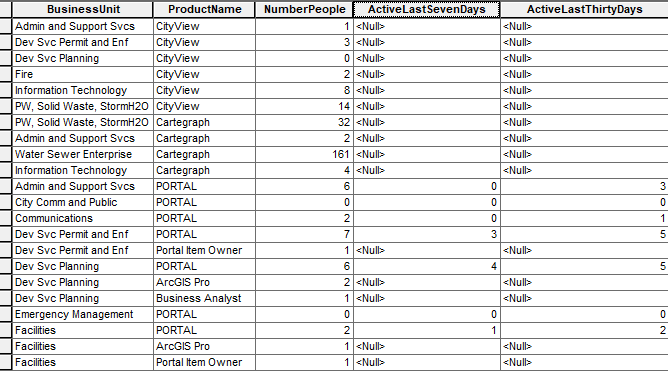
The results list now contains a list of lists such as the following: [['Admin and Support Svcs', 'CityView', 1, None, None], ['Dev Svc Permit and Enf', 'CityView', 16, None, None], ['Dev Svc Planning', 'CityView', 5, None, None], ['Fire', 'CityView', 2, None, None], ['Information Technology', 'CityView', 8, None, None], ['PW, Solid Waste, StormH2O', 'CityView', 14, None, None], ['Water Sewer Enterprise', 'CityView', 2, None, None], ['PW, Solid Waste, StormH2O', 'Cartegraph', 32, None, None], ['Admin and Support Svcs', 'Cartegraph', 2, None, None], ['Water Sewer Enterprise', 'Cartegraph', 161, None, None], ['Information Technology', 'Cartegraph', 4, None, None], ['Admin and Support Svcs', 'PORTAL', 6, 0, 3], ['City Comm and Public', 'PORTAL', 0, 0, 0], ['Communications', 'PORTAL', 2, 0, 1], ['Dev Svc Permit and Enf', 'PORTAL', 7, 3, 5], ['Dev Svc Permit and Enf', 'Portal Item Owner', 1, None, None], ['Dev Svc Planning', 'PORTAL', 6, 4, 5], ['Dev Svc Planning', 'ArcGIS Pro', 2, None, None], ['Dev Svc Planning', 'Business Analyst', 1, None, None], ['Emergency Management', 'PORTAL', 0, 0, 0], ['Facilities', 'PORTAL', 2, 1, 2], ['Facilities', 'ArcGIS Pro', 1, None, None], ['Facilities', 'Portal Item Owner', 1, None, None], ['Fire', 'PORTAL', 14, 0, 0], ['Fleet Management', 'PORTAL', 0, 0, 0], ['Freedom Hall', 'PORTAL', 0, 0, 0], ['Information Technology', 'PORTAL', 8, 3, 3], ['Information Technology', 'ArcGIS Pro', 3, None, None], ['Information Technology', 'Portal Item Owner', 2, None, None], ['Mass Transit and MTPO', 'PORTAL', 0, 0, 0], ['Parks and Rec', 'PORTAL', 5, 0, 2], ['Police', 'PORTAL', 9, 2, 3], ['PW Eng, St, and Traffic', 'PORTAL', 3, 2, 3], ['Schools', 'PORTAL', 0, 0, 0], ['Solid Waste Enterprise', 'PORTAL', 0, 0, 0], ['Stormwater Enterprise', 'PORTAL', 6, 3, 6], ['Stormwater Enterprise', 'ArcGIS Pro', 3, None, None], ['Stormwater Enterprise', 'Business Analyst', 1, None, None], ['Stormwater Enterprise', 'Portal Item Owner', 2, None, None], ['Water Sewer Enterprise', 'PORTAL', 45, 28, 36], ['Water Sewer Enterprise', 'ArcGIS Pro', 2, None, None], ['Water Sewer Enterprise', 'Portal Item Owner', 16, None, None], ['Information Technology', 'Drone2Map', 1, None, None]]
These results can then be inserted into a table with the fields "BusinessUnit" (text), "ProductName" (text), "NumberPeople" (short), "ActiveLastSevenDays" (short), and "ActiveLastThirtyDays" (short).
arcpy.env.workspace = rest_of_the_path + os.sep + 'GIS_Reports.sde'

# Start edit session
edit = arcpy.da.Editor(arcpy.env.workspace)
edit.startEditing(False, False)
edit.startOperation()

fc = arcpy.env.workspace + os.sep + 'GIS_Reports.DBO.ProductByDepartment'

# Remove all records
lyr = arcpy.MakeTableView_management(fc, "lyr")
arcpy.DeleteRows_management(lyr)

# Write
flds = ["BusinessUnit", "ProductName", "NumberPeople", "ActiveLastSevenDays", "ActiveLastThirtyDays"]
with arcpy.da.InsertCursor(fc, flds) as cursor:
    for row in results:
        cursor.insertRow(row)

# Stop edit session
edit.stopOperation()
edit.stopEditing(True)
The output table can be published as a service and used in a dashboard.